One Attendance System for Every Work Arrangement
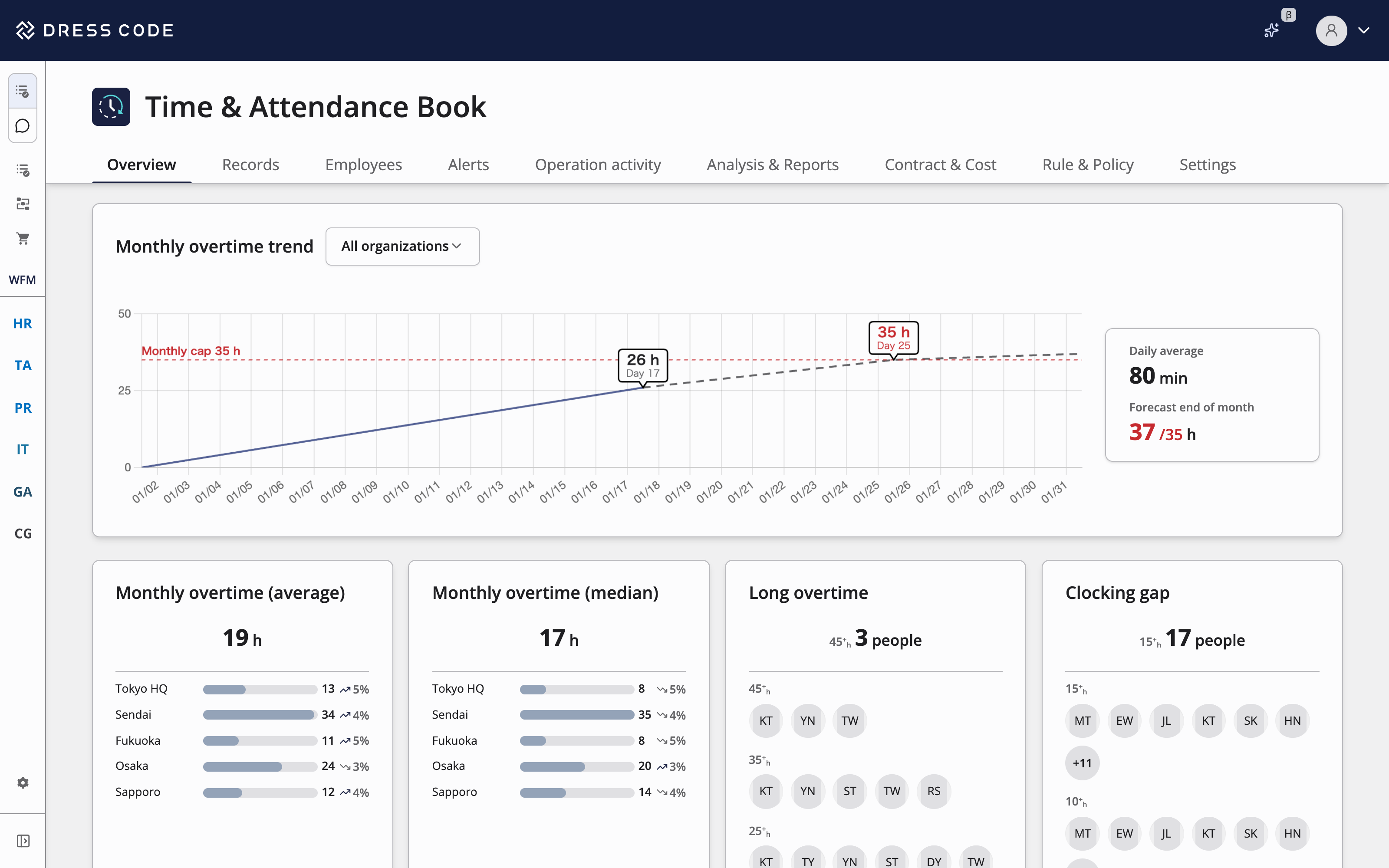
- Manage shift work, rotating shifts, flextime, discretionary work, and more the way each site runs them.
- Built-in support for Japanese labor law, with more countries and regions being added.
- Works with HR and payroll data to cut down on manual tallying.
Adoption and Security
Scale, Performance, and Reliability for Your Business
220+
Customers
99.95%
Uptime SLO
20,000+
Users Supported
5
Countries
Robust Security Backed by International Standards
SOC 2 Type II
Independently audited per AICPA standards — security, availability, and confidentiality controls verified.
ISMS (ISO/IEC 27001 / 27017)
Aligned with international standards for information security management and cloud security controls.
Encryption + Access Control
TLS 1.2, per-tenant encryption keys, SAML 2.0 SSO + MFA, AWS WAF / GuardDuty.
Common Attendance Challenges
Attendance Management Still Takes Too Much Manual Effort
- 01Work Arrangement
Challenge
Stores, shift workers, and flextime staff each use a different attendance system
Work patterns that don't fit standard presets end up in another system or a spreadsheet.
Solution
Shifts, Flextime, and More in One System
Set up shift work, rotating shifts, flextime, discretionary work, and deemed off-site work from the same building blocks.
- 02People Data
Challenge
Every hire or transfer means fixing attendance settings by hand
HR changes aren't reflected in attendance, and passing month-end figures to payroll is also manual.
Solution
Share People Data with HR and Payroll
Hires and transfers update attendance and leave settings automatically, and finalized attendance goes straight to payroll.
- 03Traceability
Challenge
You can't explain how overtime hours were calculated
You can't trace which rule applied to whom or how it was calculated, so every inquiry or audit takes time.
Solution
See Exactly Which Rules Apply to Whom
Check the work arrangement and rules behind each person's hours, step by step.
How DRESS CODE Works
HR, Attendance, and Payroll on the Same People Data
TA Force runs on the same DRESS CODE platform as HR Force. HR changes flow into attendance with no integration setup.
When Systems Are Siloed

Diverse Work Arrangements and Labor Rules Across Your Company
Head office, stores, factories, and R&D teams can each use a different work arrangement within the same company.
- +7,916
- +7,926
- +1,234
- +3,854
- +2,144
- +674
- Head OfficeFlextime
- +1,234
- StoreShift Work
- +3,854
- FactoryRotating Shifts
- +2,144
- R&DDiscretionary Work
- +674
Connected to HR and Payroll Within DRESS CODE
TA Force connects to HR Force and PR Force with no integration setup. You can also connect your current HR and payroll systems when you need to.
Statutory and Company-Specific Leave
Set rules for annual paid leave and company leave such as summer and bereavement leave.
- Child Care Leave
- Family Care Leave
- Annual Paid Leave
- Summer Leave
- Bereavement Leave
- Grant Rule
- 10 Days After 6 Months
- Up to 20 Days by Tenure
- Usage Rule
- Full or Half Days
- Hourly Leave up to 5 Days
- Expiry Rule
- Expires After 2 Years
- Unused Days Carry Over to Next Year
- Family Care Leave
- Annual Paid Leave
- Summer Leave
- Grant Rule
- 10 Days After 6 Months
- Up to 20 Days by Tenure
- Usage Rule
- Full or Half Days
- Hourly Leave up to 5 Days
- Expiry Rule
- Expires After 2 Years
- Unused Days Carry Over to Next Year
Clock-In Methods That Fit Each Site
Choose from mobile, shared terminals, face recognition, Slack, and more to fit each location and job type.
- Mobile
- GPS Location
- PC Log-On/Off
- Web Browser
- Face Recognition
- Shared Terminal
- Slack
- Microsoft Teams
- LINE
- …
Why Choose TA Force
How TA Force Compares with Conventional Attendance Systems
| Comparison | Conventional Attendance Systems | |
|---|---|---|
| Work Arrangements | Exceptions Handled in SpreadsheetsArrangements that don't fit the standard settings are managed outside the system | One SystemEvery arrangement on the same screen |
| Hires and Transfers | A Separate HR Sync to MaintainHR changes imported by CSV or API need to be checked for gaps | HR Data Used DirectlyNothing to re-enter on the attendance side |
| Payroll | Figures Re-Entered into PayrollRe-entering and checking figures takes time every month | Month-End Figures Go Straight to PayrollNo re-entry or manual checks |
| Inquiries and Audits | Calculations Traced by HandChecking how overtime was calculated takes time | Rules Shown on ScreenSee on screen which rule applied to whom |
| Legal Changes | Settings Reviewed In-HouseEach revision needs to be checked against your own settings | Handled by Product UpdatesWe update the product when laws change |
Work Arrangements
Conventional Attendance Systems
Exceptions Handled in Spreadsheets
Arrangements that don't fit the standard settings are managed outside the system
One System
Every arrangement on the same screen
Hires and Transfers
Conventional Attendance Systems
A Separate HR Sync to Maintain
HR changes imported by CSV or API need to be checked for gaps
HR Data Used Directly
Nothing to re-enter on the attendance side
Payroll
Conventional Attendance Systems
Figures Re-Entered into Payroll
Re-entering and checking figures takes time every month
Month-End Figures Go Straight to Payroll
No re-entry or manual checks
Inquiries and Audits
Conventional Attendance Systems
Calculations Traced by Hand
Checking how overtime was calculated takes time
Rules Shown on Screen
See on screen which rule applied to whom
Legal Changes
Conventional Attendance Systems
Settings Reviewed In-House
Each revision needs to be checked against your own settings
Handled by Product Updates
We update the product when laws change
TA Force Features
Key Features
Manage clock-ins, attendance records, leave, shifts, and attendance calculations in one place.
- Time & Attendance BookRecords daily and monthly attendance and analyzes working hours.
- Time & Attendance CoreRuns month-end closing and one-off adjustments.
- Time & Attendance EngineDefines calculation rules for rounding, premium pay rates, and totals.
- Clock-in MethodsSupports clock-in from the web, mobile devices, and IC cards, as well as external time clocks.
- Work ArrangementsDefines and applies fixed hours, flextime, discretionary work, and shift patterns.
- Holidays and LeavesManages paid and special leave balances, substitute holidays, and the holiday calendar.
- Work Schedules & ShiftsBuilds shifts with labor costs in view and flags scheduling issues.
Supported Work Arrangements and Regulations
We're adding more built-in work arrangements and regulations over time.
- Fixed Hours
- Shift Work
- Rotating Shifts
- Flextime
- Discretionary Work
- Deemed Hours for Off-Site Work
- Monthly Variable Working Hours
- Annual Variable Working Hours
- Managerial Staff
- Reduced Working Hours
- Article 36 Overtime Agreements
- Overtime Caps
- Rest Periods Between Shifts
- Mandatory 5 Days of Annual Leave
- Objective Recording of Working Hours
Getting Started
- 1
Contact Us or Download the Guide
Tell us about your work arrangements and headcount.
- 2
Requirements Review
We review your work rules, leave policies, and the HR and payroll systems you want to connect.
- 3
Initial Setup
We set up work arrangements and calculation rules, and import your employee data.
- 4
Go-Live
We support you through your first month-end close and are available to fine-tune settings after that.
FAQ
TA Force is a time and attendance service from Dress Code Inc. It keeps clock-ins, attendance records, leave, shifts, and attendance calculations alongside your HR and organization data.
Yes. Define each pattern as a work arrangement and run them side by side. You can also change which arrangement applies to each person.
Yes. TA Force includes employee records and organizational information. You can add HR Force, IT Force, or GA Force later.
Yes. TA Force sends finalized attendance figures to your payroll system. Contact us for the list of supported systems.
Yes. You can import work arrangements and employee data from CSV, and we'll plan the migration with you.
Pricing depends on headcount and the features you use. Contact us for a quote.

Ready to try DRESS CODE?
Bring attendance together with HR and payroll
Dress Code Accelerates Your Business Operations Superconducting Silo and Friction
- Careers
- For Engineers
- For Business Roles
- Open Positions
- These pages are available in Japanese only.
© 2026 Dress Code Inc. All Rights Reserved.