IdP
Make SaaS logins secure and simple with single sign-on and multi-factor authentication. Integrate with the HR ledger to centrally manage who can access which SaaS under what conditions, based on department, role, employment type, and more.
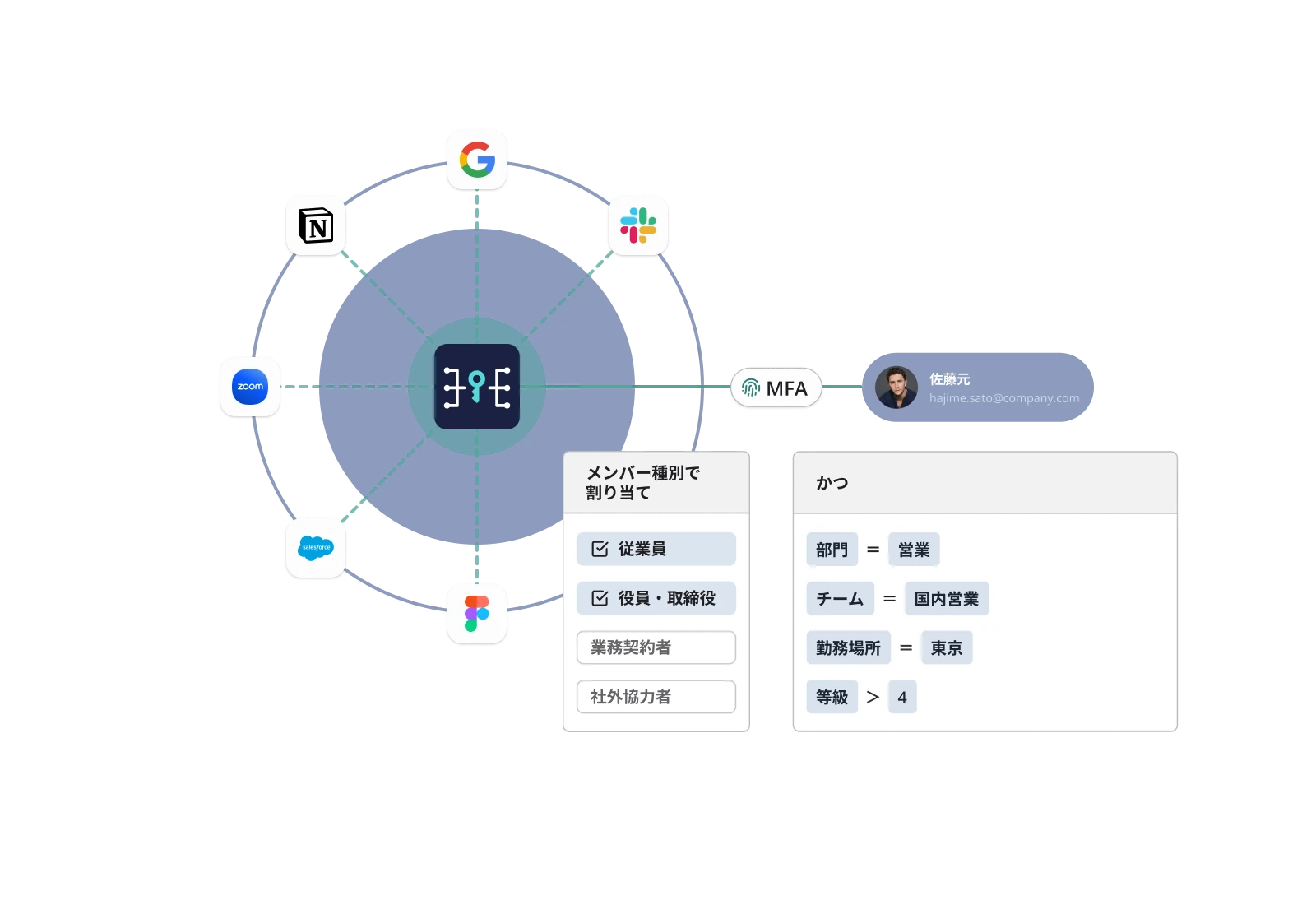
DRESS CODE redefines authentication management
Bring your SaaS logins together in one place
Sign in with your DRESS CODE ID to SaaS that supports SAML or OIDC through single sign-on. Combine single sign-on with multi-factor authentication to reduce the burden of managing IDs and passwords for each SaaS and deliver a secure, simple login experience.
Connect people to what they access and centralize authentication rules
Set access rules by combining member groups created by department, role, employment type, and more with the SaaS they use and authentication policies. Centrally manage who can access which SaaS under what conditions.
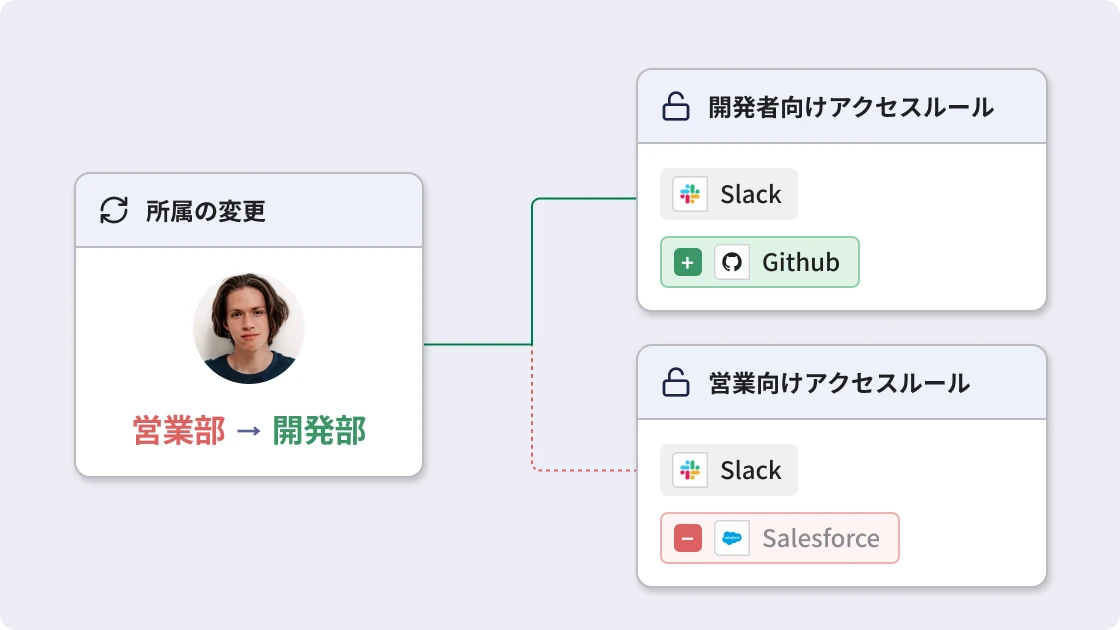
Switch access rules as people move
Update member groups based on department, employment type, and employment status in the HR ledger, and switch the rules applied. Keep authentication management aligned with HR data without managing people individually at every hire, transfer, or departure.
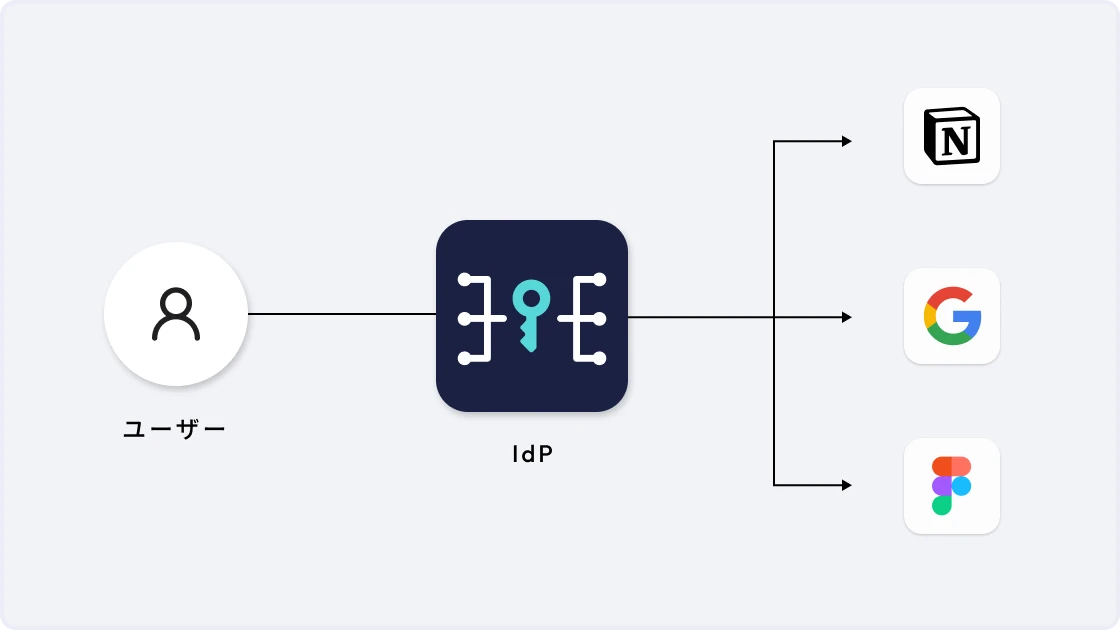
Sign in to SAML and OIDC SaaS with single sign-on
Use DRESS CODE as your IdP to connect with SaaS that supports SAML or OpenID Connect via standard protocols. Employees log in to multiple SaaS with their DRESS CODE ID, with no passwords to remember for each service. Reduce password-reset inquiries while consolidating authentication into a single entry point.
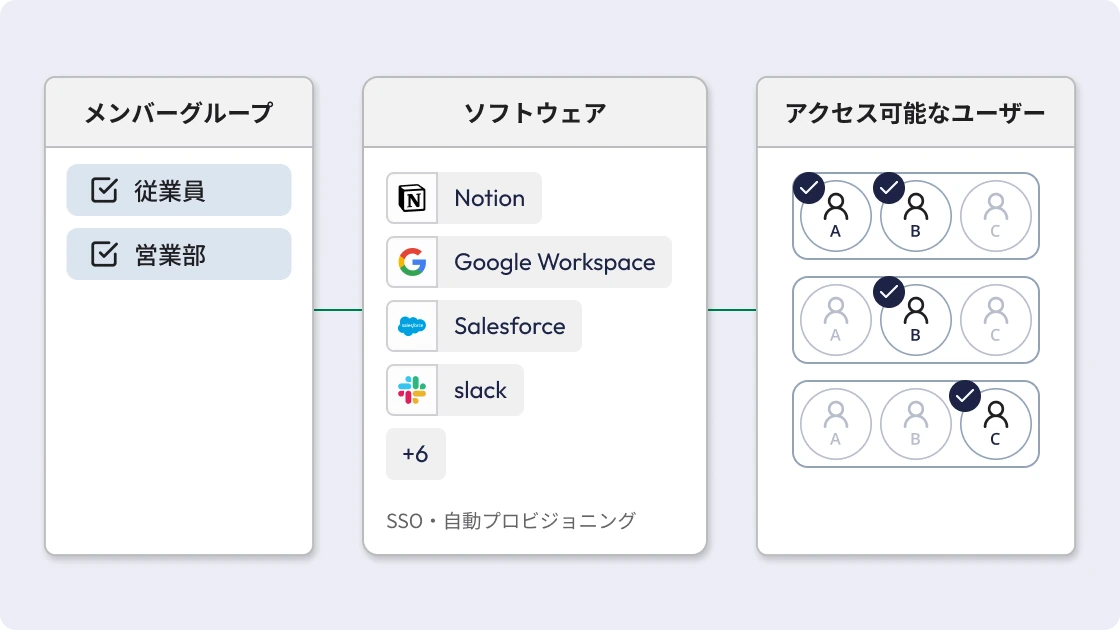
Manage which SaaS each department and role can access
Create member groups from department, role, employment type, and more in the HR ledger, and set the SaaS they can access along with authentication policies. For example, give the accounting department accounting software and contractors only the SaaS they need for their work. Manage who can access what based on HR data, with no separate lists of people to maintain.
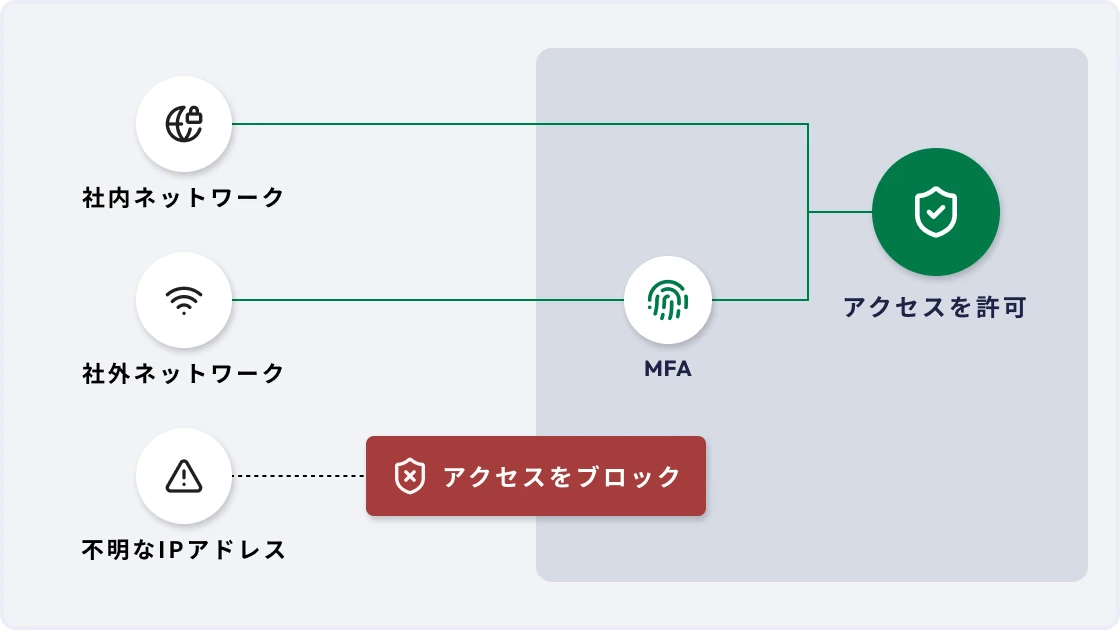
Switch authentication based on network and device
Switch between allow, MFA, and deny based on conditions such as the source IP address and device status. Allow access from the corporate network as-is and require MFA from outside, setting authentication that fits how people work. Deny access from suspicious IP addresses or lost devices and strengthen authentication based on risk.
Review access as people join, transfer, and leave
When department, employment type, or employment status changes in the HR ledger, member groups and the access rules applied are updated accordingly. Manage, based on HR data, whether access to SaaS from a previous department remains or whether departed employees can still get in, and prevent missed access reviews.
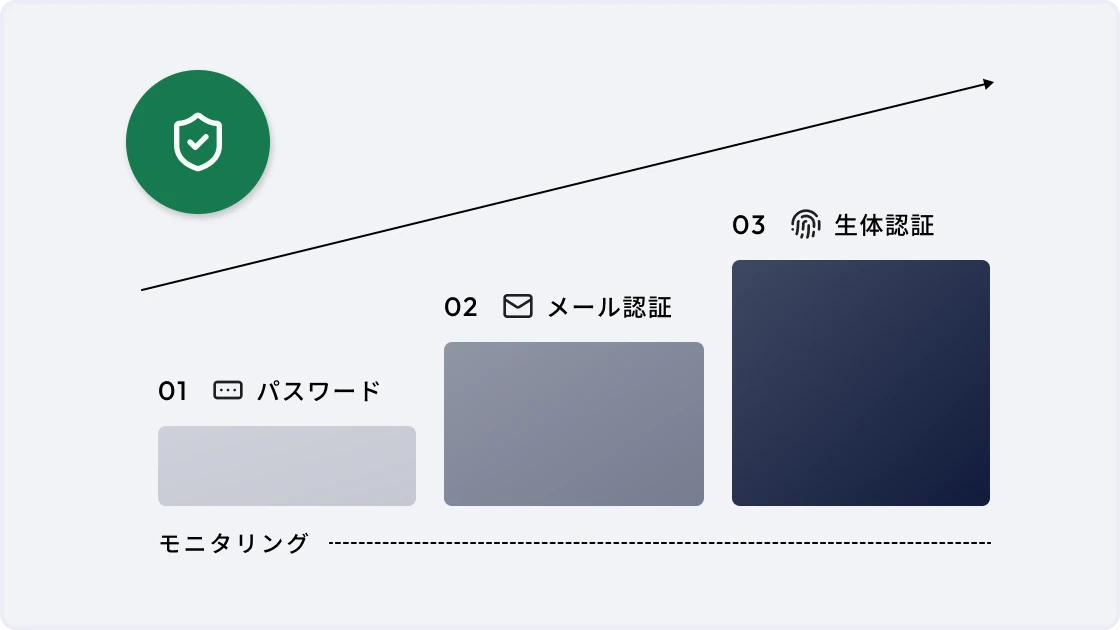
Strengthen authentication policies step by step while monitoring the impact
Instead of enforcing a new authentication policy all at once, start with monitoring that records the results. Then strengthen enforcement step by step — checks at login, periodic rechecks during use, and session time limits. Move to the right authentication level for your company while monitoring the impact on actual use.
Modules
Get your operations done
Single sign-on
Sign in with your DRESS CODE ID to SaaS that supports SAML or OIDC. Consolidate logins to multiple SaaS and reduce per-service password management.
Multi-factor authentication
Use multi-factor authentication with email one-time codes and authenticator apps. Reduce the risk of unauthorized logins with additional authentication beyond IDs and passwords.
Access rules
Combine member groups, the SaaS they use, and authentication policies to set rules for who can access which SaaS under what conditions.
Authentication policies
Set allow, MFA, or deny based on conditions such as IP address and device status. Combine multiple conditions to apply authentication that fits usage and risk.
HR ledger integration
Manage member groups based on HR data such as department, role, and employment type. Switch the access rules applied as people join, transfer, or leave.
Enforcement mode
Set step by step how strictly to enforce authentication policies — monitoring, checks at login, periodic rechecks during use, session time limits, and more.
IP address restrictions
Set allow, MFA, or deny based on the IP addresses of offices, VPNs, and more. Adjust authentication strength depending on where the connection comes from, such as inside or outside the company.
Device restrictions
Use the status of the device used for access as an authentication condition. Restrict access from devices you do not allow, such as revoked or lost devices.
Block list
Register suspicious IP addresses and revoked or lost devices as blocked. Deny matching access regardless of other authentication conditions.
Software ledger integration
Link SaaS managed in the software ledger with SSO settings and manage each SaaS as a target of access rules. Connect contract and account management with authentication management, starting from the same software information.
Overview
Bring together login counts, allow/MFA/deny counts, SaaS with SSO configured, and more. Monitor authentication usage and states that need action on one screen.
Operation activity
Record activity logs for changes to SSO, multi-factor authentication, authentication policies, and other settings. Trace who changed which settings and when, and use the records for audits.
Workflow integration
Connect with request and approval workflows for SaaS use and adding or changing access rights. Carry approved requests through to applying access rules to the people concerned.
Notifications
Notify the people responsible via Slack, Teams, or email of failed logins, access denied by authentication policies, important setting changes, and more. Catch authentication anomalies and changes right away.
Authentication policies
Set allow, MFA, or deny based on conditions such as IP address and device status. Combine multiple conditions to apply authentication that fits usage and risk.
HR ledger integration
Manage member groups based on HR data such as department, role, and employment type. Switch the access rules applied as people join, transfer, or leave.
Enforcement mode
Set step by step how strictly to enforce authentication policies — monitoring, checks at login, periodic rechecks during use, session time limits, and more.
IP address restrictions
Set allow, MFA, or deny based on the IP addresses of offices, VPNs, and more. Adjust authentication strength depending on where the connection comes from, such as inside or outside the company.
Device restrictions
Use the status of the device used for access as an authentication condition. Restrict access from devices you do not allow, such as revoked or lost devices.
Block list
Register suspicious IP addresses and revoked or lost devices as blocked. Deny matching access regardless of other authentication conditions.
Software ledger integration
Link SaaS managed in the software ledger with SSO settings and manage each SaaS as a target of access rules. Connect contract and account management with authentication management, starting from the same software information.
Overview
Bring together login counts, allow/MFA/deny counts, SaaS with SSO configured, and more. Monitor authentication usage and states that need action on one screen.
Operation activity
Record activity logs for changes to SSO, multi-factor authentication, authentication policies, and other settings. Trace who changed which settings and when, and use the records for audits.
Workflow integration
Connect with request and approval workflows for SaaS use and adding or changing access rights. Carry approved requests through to applying access rules to the people concerned.
Notifications
Notify the people responsible via Slack, Teams, or email of failed logins, access denied by authentication policies, important setting changes, and more. Catch authentication anomalies and changes right away.

Ready to try DRESS CODE?
Contact us, and we'll be in touch shortly.

Dress Code Accelerates Your Business Operations Superconducting Silo and Friction
- Careers
- For Engineers
- For Business Roles
- Open Positions
- These pages are available in Japanese only.
© 2026 Dress Code Inc. All Rights Reserved.